Test WordPress and WooCommerce functionality with GitHub actions

When I found the Reflect.run test automation SaaS tool years ago, they had a free tier that allowed you to visually construct website functionality tests and run them on a regular basis.

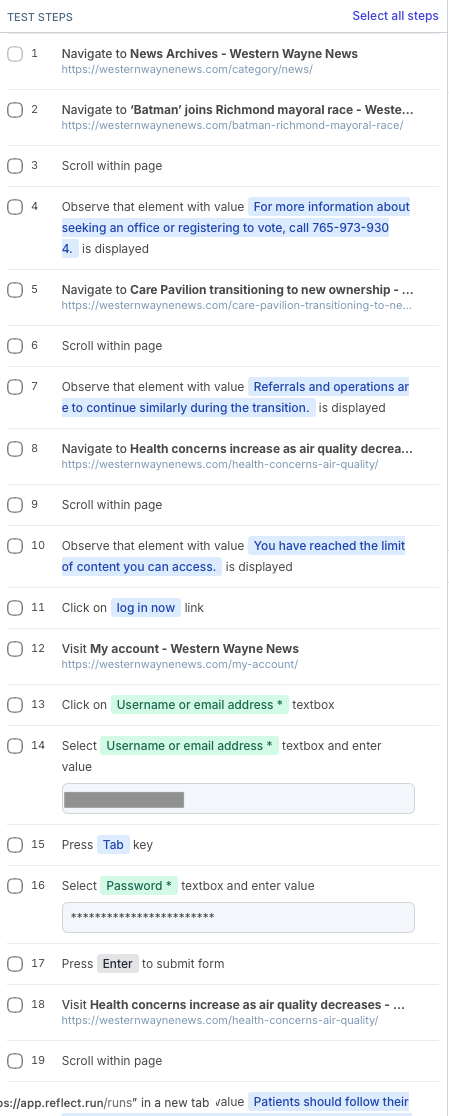
I used them to test our newspaper website’s basic functionality that went beyond a “does the page load” check: are articles paywalled appropriately, can you load and submit our contact form, if you have a subscription and log in can you see articles and our print archives, etc. It was pretty slick:
Then the service removed their free tier and my budget didn’t support their asking price, so we didn’t have those tests for a while. A recent bug caused by plugin update reminded me of their usefulness and importance, so I revisited the issue.

I’ve known about Playwright for a while now but have never worked with it directly. Claude helped me think through implementation details and we arrived at a plan for a smoke suite run on GitHub actions. It works pretty well!

Running 5 tests using 1 worker
  ✓  1 [chromium] › tests/wp-contact-form.spec.ts:8:9 › WWN WP: contact form › WWN WP: contact page loads and empty submit shows validation errors (24.5s)
  ✘  2 [chromium] › tests/wp-gift-subscription-cart.spec.ts:12:9 › WWN WP: gift subscription › WWN WP: gift subscription can be added to cart and reaches checkout (24.8s)
  ✓  3 [chromium] › tests/wp-gift-subscription-cart.spec.ts:12:9 › WWN WP: gift subscription › WWN WP: gift subscription can be added to cart and reaches checkout (retry #1) (25.1s)
  ✘  4 [chromium] › tests/wp-metered-content-login.spec.ts:7:9 › WWN WP: metered content › WWN WP: metered paywall gate appears, then login unlocks article (1.2m)
  ✓  5 [chromium] › tests/wp-metered-content-login.spec.ts:7:9 › WWN WP: metered content › WWN WP: metered paywall gate appears, then login unlocks article (retry #1) (58.9s)
  ✓  6 [chromium] › tests/wp-online-access-account.spec.ts:11:9 › WWN WP: online access and account › WWN WP: print edition requires login, subscriber can open an issue and view account (58.0s)
  ✓  7 [chromium] › tests/wp-subscribe-checkout.spec.ts:8:9 › WWN WP: subscribe to checkout › WWN WP: subscription can be added to cart and reaches checkout (17.0s)

First, I set up Playwright (Typescript) test definitions for each thing I wanted to check. For example, here’s the one that tests our contact form:

import { test, expect } from './support/fixtures';
import { NAV, humanPause, assertNotChallenged } from './support/wp';

test.describe('WWN WP: contact form', () => {
    test('WWN WP: contact page loads and empty submit shows validation errors', async ({ page }) => {
        await test.step('Home page -> Contact Us', async () => {
            const response = await page.goto('/', NAV);
            await assertNotChallenged(page);
            expect(response?.ok(), 'WWN WordPress: home page did not load').toBeTruthy();
            await humanPause(page);

            // Contact Us appears in the header, the secondary nav and the footer, plus a hidden mobile copy.
            // Scope to the desktop secondary nav and take the visible one.
            await page
                .locator('#secondary-nav-contain')
                .getByRole('link', { name: /^contact us$/i })
                .click();
            await expect(page).toHaveURL(/\/contact\/?$/);
            await assertNotChallenged(page);
        });

        await test.step('Form is displayed', async () => {
            await expect(page.getByText('Your email address (required)')).toBeVisible();
        });

        await test.step('Empty submit shows validation errors', async () => {
            await humanPause(page);
            await page.locator('#csbutton').click();

            // Inline per-field tips are what users see. Scope to them to avoid the hidden SR summary list.
            const tips = page.locator('.wpcf7-not-valid-tip');
            await expect(tips.first()).toBeVisible({ timeout: 20_000 });
            await expect(tips.filter({ hasText: 'The field is required.' }).first()).toBeVisible();

            // Three required fields on this form: name, email, message.
            await expect(tips).toHaveCount(3);

            // The form-level message is aria-hidden, so assert text rather than visibility.
            await expect(page.locator('.wpcf7-response-output')).toContainText(
                'One or more fields have an error. Please check and try again.',
            );
        });
    });
});

You’ll notice some logic around human-like pauses and detecting whether Cloudflare challenges appear. The Cloudflare problem (love you, Cloudflare, kisses) evolved into the need to try to bypass it in a more comprehensive way for these tests. So, at the Cloudflare domain level, there’s a WAF rule that bypasses all bot detection when a given header and secret value is present in the request.

import { test as base, expect } from '@playwright/test';

const SITE_HOST = new URL(process.env.WWN_WP_BASE_URL ?? 'https://oursite.com').hostname;

export const test = base.extend({
    context: async ({ context }, use) => {
        const secret = process.env.OUR_SECRET;
        if (secret) {
            await context.route(
                (url) => url.hostname === SITE_HOST,
                (route) =>
                    route.continue({
                        headers: { ...route.request().headers(), 'X-Our-Special-Header': secret },
                    }),
            );
        }
        await use(context);
    },
});

export { expect };

Once the tests were written, the GitHub action workflow file pulls it all together:

name: WWN WordPress Monitor

permissions:
  contents: read

on:
  schedule:
    - cron: '30 9 * * *'
  workflow_dispatch:

jobs:
  wordpress-tests:
    name: WWN WordPress site tests
    runs-on: ubuntu-latest
    timeout-minutes: 15
    env:
      OUR_USER: ${{ secrets.OUR_USER }}
      OUR_PASS: ${{ secrets.OUR_PASS }}
      OUR_SECRET: ${{ secrets.OUR_SECRET }}
    steps:
      - uses: actions/checkout@v4

      - uses: actions/setup-node@v4
        with:
          node-version: 22
          cache: npm

      - run: npm ci

      - run: npx playwright install --with-deps chromium

      - name: Run Playwright tests
        run: npx playwright test

      - name: Annotate failure for Nagios
        if: failure()
        run: |
          titles=$(jq -r '[.. | objects | select(has("specs")) | .specs[] | select(.ok == false) | .title] | unique | join(", ")' test-results/results.json 2>/dev/null || true)
          msg="WWN WordPress: failed - ${titles:-see run logs}"
          echo "::error title=WWN WordPress::${msg:0:200}"
      - name: Upload reports
        if: ${{ !cancelled() }}
        uses: actions/upload-artifact@v4
        with:
          name: wwn-wordpress-monitor-reports
          path: |
            playwright-report
            test-results
          retention-days: 14

As it says, the workflow annotates what happens in each run to be useful for monitoring by Nagios, which we use to know when things are broken in our small business infrastructure.

So, then a “simple” Nagios custom check script can ask the GitHub API how things went in the latest run:

#!/usr/bin/env bash
# Nagios plugin: WWN WordPress Monitor (GitHub Actions workflow status, pull model).
# Deps: bash, curl, jq. Exit: 0 OK, 1 WARNING, 2 CRITICAL, 3 UNKNOWN.

PREFIX="WWN WordPress:"
API="https://api.github.com"
REPO=""; WORKFLOW="wordpress-monitor.yml"; TOKEN=""
MAX_AGE=93600; BRANCH="main"; EXPIRE_DAYS=14

usage() {
  cat <<USAGE
Usage: $0 -r owner/repo -t token [-w workflow_file] [-a max_age_seconds] [-b branch] [-e days] [-h]
  -r  owner/repo (required)
  -t  GitHub fine-grained PAT (required, probably from a Nagios $USER var)
  -w  workflow file (default: $WORKFLOW)
  -a  max age in seconds of last completed run (default: $MAX_AGE)
  -b  branch (default: $BRANCH)
  -e  warn if token expires within this many days (default: $EXPIRE_DAYS)
  -h  this help
USAGE
}

unknown() { echo "$PREFIX UNKNOWN - $1"; exit 3; }

while getopts "r:w:t:a:b:e:h" opt; do
  case $opt in
    r) REPO=$OPTARG ;; w) WORKFLOW=$OPTARG ;; t) TOKEN=$OPTARG ;;
    a) MAX_AGE=$OPTARG ;; b) BRANCH=$OPTARG ;; e) EXPIRE_DAYS=$OPTARG ;;
    h) usage; exit 3 ;;
    *) usage >&2; exit 3 ;;
  esac
done

[ -n "$REPO" ] || unknown "missing required option -r owner/repo"
[ -n "$TOKEN" ] || unknown "missing required option -t token"
[[ "$MAX_AGE" =~ ^[0-9]+$ && "$EXPIRE_DAYS" =~ ^[0-9]+$ ]] || unknown "-a and -e must be integers"
command -v curl >/dev/null 2>&1 || unknown "curl not installed"
command -v jq >/dev/null 2>&1 || unknown "jq not installed"

HDRS=$(mktemp) ; BODY=$(mktemp)
trap 'rm -f "$HDRS" "$BODY"' EXIT

# gh_get <path-and-query>; sets HTTP_CODE; body in $BODY, headers in $HDRS.
# Auth header goes through a curl config on stdin so it is not in the process list.
gh_get() {
  HTTP_CODE=$(printf 'header = "Authorization: Bearer %s"\n' "$TOKEN" | curl -sS -K - \
    --max-time 20 -o "$BODY" -D "$HDRS" -w '%{http_code}' \
    -H "Accept: application/vnd.github+json" \
    -H "X-GitHub-Api-Version: 2022-11-28" \
    -H "User-Agent: check_wwn_wordpress_monitor" \
    "$API$1" 2>/dev/null) || { HTTP_CODE=000; return 1; }
}

human() { # seconds -> 5h12m / 2h / 14m / 30s
  local s=$1 d h m
  d=$((s/86400)); h=$(((s%86400)/3600)); m=$(((s%3600)/60))
  if [ "$d" -gt 0 ]; then echo "${d}d${h}h"
  elif [ "$h" -gt 0 ]; then if [ "$m" -gt 0 ]; then echo "${h}h${m}m"; else echo "${h}h"; fi
  elif [ "$m" -gt 0 ]; then echo "${m}m"
  else echo "${s}s"; fi
}

gh_get "/repos/$REPO/actions/workflows/$WORKFLOW/runs?branch=$BRANCH&status=completed&per_page=1&exclude_pull_requests=true" \
  || unknown "network error or timeout contacting api.github.com"

case $HTTP_CODE in
  200) ;;
  401) unknown "HTTP 401: token expired or revoked, or lacks access to the repo" ;;
  403|429)
    if grep -qi '^x-ratelimit-remaining: 0' "$HDRS" || jq -e '.message|test("rate limit";"i")' "$BODY" >/dev/null 2>&1; then
      unknown "GitHub API rate limit hit"
    fi
    unknown "HTTP $HTTP_CODE: token lacks permission (needs Actions: read) or org approval pending" ;;
  404) unknown "HTTP 404: repo or workflow not found, or token lacks access (check -r, -w, token scope)" ;;
  *) unknown "unexpected HTTP status $HTTP_CODE from GitHub" ;;
esac

jq -e '.workflow_runs|type=="array"' "$BODY" >/dev/null 2>&1 || unknown "malformed JSON from GitHub"
[ "$(jq '.workflow_runs|length' "$BODY")" -gt 0 ] || unknown "no completed runs found for $WORKFLOW on branch $BRANCH"

RUN=$(jq -c '.workflow_runs[0]' "$BODY")
IFS=$'\t' read -r RUN_ID RUN_NUM CONCLUSION URL AGE < <(jq -r --argjson now "$(date +%s)" \
  '[.id,.run_number,(.conclusion//"unknown"),.html_url,($now - (.updated_at|fromdateiso8601))]|@tsv' <<<"$RUN" 2>/dev/null) \
  || unknown "malformed run data from GitHub"
[[ "$AGE" =~ ^-?[0-9]+$ && -n "$RUN_ID" ]] || unknown "malformed run data from GitHub"
[ "$AGE" -lt 0 ] && AGE=0

# Token expiry (header present only for fine-grained PATs with expiry)
EXP_NOTE=""; EXP_WARN=0
EXP_HDR=$(grep -i '^github-authentication-token-expiration:' "$HDRS" | head -1 | cut -d: -f2- | tr -d '\r' | sed 's/^ *//')
if [ -n "$EXP_HDR" ]; then
  # Format: "2026-11-01 12:00:00 UTC"
  EXP_ISO=$(sed -E 's/^([0-9-]+) ([0-9:]+).*/\1T\2Z/' <<<"$EXP_HDR")
  EXP_EPOCH=$(jq -rn --arg t "$EXP_ISO" '$t|fromdateiso8601' 2>/dev/null)
  if [[ "$EXP_EPOCH" =~ ^[0-9]+$ ]]; then
    LEFT=$((EXP_EPOCH - $(date +%s)))
    if [ "$LEFT" -lt $((EXPIRE_DAYS*86400)) ]; then
      EXP_WARN=1; EXP_NOTE="token expires ${EXP_HDR%% *}"
    fi
  fi
fi

AGE_H=$(human "$AGE")
PERF="| age=${AGE}s;${MAX_AGE};;"
finish() { # state code, message
  local msg=$2
  [ -n "$EXP_NOTE" ] && msg="$msg (WARNING: $EXP_NOTE)"
  echo "$PREFIX $1 - $msg $PERF"; exit "$3"
}

if [ "$AGE" -gt "$MAX_AGE" ]; then
  finish CRITICAL "stale: last completed run was $AGE_H ago" 2
fi

case $CONCLUSION in
  success)
    if [ "$EXP_WARN" -eq 1 ]; then
      finish WARNING "last run passed $AGE_H ago (run #$RUN_NUM) but $EXP_NOTE" 1
    fi
    finish OK "last run passed $AGE_H ago (run #$RUN_NUM)" 0 ;;
  failure|timed_out|startup_failure)
    DETAIL=""
    if gh_get "/repos/$REPO/actions/runs/$RUN_ID/jobs?per_page=100" && [ "$HTTP_CODE" = 200 ]; then
      JOBINFO=$(jq -r '[.jobs[]?|select(.conclusion=="failure" or .conclusion=="timed_out")][0]
        | if .==null then empty else [.id,.name,([.steps[]?|select(.conclusion=="failure" or .conclusion=="timed_out")][0].name//"")]|@tsv end' "$BODY" 2>/dev/null)
      if [ -n "$JOBINFO" ]; then
        IFS=$'\t' read -r JOB_ID JOB_NAME STEP_NAME <<<"$JOBINFO"
        if [ -n "$STEP_NAME" ]; then DETAIL=" at step '$STEP_NAME'"; else DETAIL=" in job '$JOB_NAME'"; fi
        if gh_get "/repos/$REPO/check-runs/$JOB_ID/annotations" && [ "$HTTP_CODE" = 200 ]; then
          ANN=$(jq -r '[.[]?|select((.message//"")|startswith("WWN WordPress:"))][0].message//empty' "$BODY" 2>/dev/null | head -c 200)
          [ -n "$ANN" ] && DETAIL="$DETAIL: $ANN"
        fi
      fi
    fi
    finish CRITICAL "last run ${CONCLUSION/failure/failed} $AGE_H ago$DETAIL $URL" 2 ;;
  cancelled|skipped|neutral|action_required|stale)
    finish WARNING "last run $CONCLUSION $AGE_H ago (run #$RUN_NUM) $URL" 1 ;;
  *)
    unknown "unrecognized run conclusion '$CONCLUSION'" ;;
esac

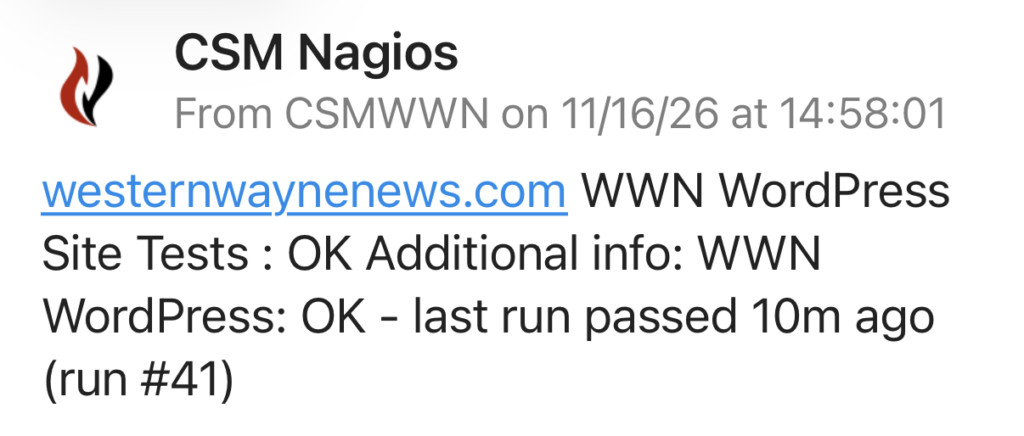
Then Nagios can alert me if things are falling apart, or if things have recovered after problems, e.g. via Pushover:
And if there is a problem that needs investigating, the “artifact” available in the GitHub action run details is a zipfile of the Playwright run report, a self-contained HTML and image bundle with all the details and screenshots. Amazing.

The Cloudflare bypass is not perfect, it seems some of GitHub’s action infrastructure IPs trigger “are you human” checks with Cloudflare no matter what. And the run timing seems to be a bit inconsistent (based on whether GitHub actions are having issues, I think) so the monitoring we’re doing has had some false alarms for delayed runs. But otherwise, I’m pretty happy with it.


Use the WordPress REST API to create a custom taxonomy term

It’s unreasonably difficult to find information about working with custom taxonomies and their terms in the WordPress REST API. It would be easy to conclude that it’s not possible or that one has to create a custom endpoint to achieve that functionality.

It ends up being fairly straightforward, so I’m sharing what I learned here in case it saves someone else time.

The developer REST API reference endpoint list doesn’t make any obvious reference to custom taxonomies or terms. If you end up on the tags endpoint reference page, you’ll see that there’s a way to work with these terms in the standard post_tag taxonomy, but no way to specify a custom taxonomy during write operations. There’s actually a taxonomies endpoint reference page that doesn’t seem to be linked to from the main navigation anywhere, but can be found in a search; still, nothing on it about working with terms in those taxonomies.

But eventually you’ll find your way to the page Adding REST API Support For Custom Content Types, which has a section Registering A Custom Taxonomy With REST API Support that finally makes it clear that in order to work with custom taxonomies in the REST API, you have to enable/create an endpoint for that purpose.

In your custom taxonomy definition, it ends up being pretty simple with these additional arguments to the register_taxonomy call:

    'show_in_rest'          =&gt; true,
    'rest_base'             =&gt; 'my-taxonomy-api-slug',
    'rest_controller_class' =&gt; 'WP_REST_Terms_Controller',

The second two are optional, where you can define the REST API url slug and controller you want to use; if you leave them out it will use the default terms controller and a slug derived from your taxonomy definition.

With this code in place, you’ll now have two new REST API endpoints available:

 /wp/v2/my-taxonomy-api-slug
 /wp/v2/my-taxonomy-api-slug/(?P&lt;id&gt;[\d]+)

You can then essentially treat those the same way as the tags endpoints, getting/posting to create, update and retrieve terms in that custom taxonomy. For example, to create a new term:

POST https://example.test/wp-json/wp/v2/my-taxonomy-api-slug

slug:my-first-term
name:My First Term

I’ve submitted a pull request to the WP API docs to add at least one pointer in the documentation to help others on a similar quest get there faster.

Updated May 3 @ 11:49 AM Eastern to note that the second two taxonomy registration options rest_base and rest_controller_class are optional to define, thanks to Marcus Kober for noting this.

WooCommerce Subscriptions API start_date bug workaround

The WooCommerce Subscriptions plugin has a bug where if you use its REST API endpoints to make updates to a subscription, it will almost always reset the start date of the subscription you are updating to the current date and time.

I reported the bug to the WooCommerce folks in November 2022 and I believe it has a GitHub issue filed. When I checked in about it recently I was told it’s a low priority to fix. I consider it somewhat serious for my purposes — unexpectedly overwriting/losing key data about a record that’s used in calculating user-facing financial transactions —  so I’m documenting it here for others who might encounter it, along with a possible workaround.

The bug is in the plugin file includes/api/class-wc-rest-subscriptions-controller.php that processes the incoming API request. In particular, in the function prepare_object_for_database() there’s this code:

// If the start date is not set in the request, set its default to now.
if ( ! isset( $request['start_date'] ) ) {
	$request['start_date'] = gmdate( 'Y-m-d H:i:s' );
}

All of the valid dates contained in the $request array are subsequently copied into an array called $dates. Later in the same function, there’s this code:

if ( ! empty( $dates ) ) {
	...
	try {
		$subscription->update_dates( $dates );
	} catch ( Exception $e ) {
		...
	}
}

The implication is that for completely unrelated API requests to change something like, say, a meta field value or the subscription’s status, the date validation and update logic will be run. And because the start date value is overridden to be the current date, it means that any API request to update a completely unrelated field is going to unintentionally reset the start date of the subscription.

Nothing about the documentation at https://woocommerce.github.io/subscriptions-rest-api-docs/?php#update-a-subscription indicates that a start_date value is required in the API requests. In fact, the example given in those docs where the status of a subscription is updated would trigger this bug.

I’ve even noticed this bug surfacing even in regular wp-admin operations involving WooCommerce Subscriptions, as I think some of the logic used to do something like put a subscription on hold or cancel it from within the admin interface is calling the same internal functions.

My workaround for this bug, at least on the API client side, introduces an extra API request, and so is less than ideal for any kind of production or long-term use.

For every API request I make to the Subscriptions API update endpoint, if I’m not explicitly setting/changing the start_date field in my request, I first fetch the existing subscription record and then set the start_date field in my request to the current value.

if ('subscription' === $recordType && empty($updateValues['start_date'])) {
      $current_values = $wooApiFacade::find($recordId);
      $updateValues['start_date'] = Carbon::parse($current_values['start_date_gmt'])->format('Y-m-d\ H:i:s');
}

Hopefully they’ll fix this issue sooner rather than later so that users of the plugin don’t unexpectedly see subscription start dates overwritten.

Customizing Newsletter Glue for WordPress post notifications

I love the Newsletter Glue plugin for WordPress. Before I found it, I had tinkered for a long time with different imperfect solutions to what seemed like a simple need: quickly and easily send people an engaging, visually appealing email when I publish a new article on my website.

I’ve tried manually sending out Mailchimp campaigns after publishing (too slow and cumbersome to customize per post), using messages sent directly from my WordPress host server (too prone to being flagged as spam), automatically generating Mailchimp campaigns from an RSS feed (limited scheduling options and prone to errors), using WordPress.com new post notifications via Jetpack (not very customizable), developing my own plugin to send on demand via MailChimp’s API (very functional but not easily re-usable across sites), and others.

Alas, nothing felt quite like what I wanted.

I’d revisit the challenge now and then, especially when I’d see everybody over there loving on Substack like “oh isn’t amazing how you can send out a readable email newsletter from a website, what an innovation” and found myself rolling my eyes especially hard. “SURELY WE SHOULD BE ABLE TO DO THAT WITH WORDPRESS!” I’d exclaim. And then my family would look at me with tilted heads before going back to whatever they were doing.

I was about to start putting some serious time into turning my own proof of concept Mailchimp API plugin into something reusable and shareable, when I did one last round of research into existing options. And that’s when I found Newsletter Glue. The sky opened up. Light shone down. I did a dance. At least that’s what it felt like. (I see that Justin Tadlock at WP Tavern has had a similar experience.)

So, yes, ahem, where was I? Oh, right: Newsletter Glue is an elegant solution to a real need in the world of WordPress publishing. Go check it out if you haven’t already. I bought a 5-site license and sent Lesley Sim, one of the plugin’s co-creators, a note of appreciation.

The rest of this blog post is about a few additional Newsletter Glue customizations I set up. While some of this is possible via the Newsletter Glue UI, I did it via a small custom plugin that I could re-use across all of my WordPress sites without additional configuration.

Continue reading Customizing Newsletter Glue for WordPress post notifications

Unlocking email content into RSS feeds redux with WordPress and Postie

As a part of some local journalism projects I’m exploring, I wanted to have a way to get information that is being emailed around (press releases, newsletters) into a publicly accessible RSS feed.

I’ve already explored this general “unlock email into an RSS feed” workflow using Zapier but Zapier’s limitations around translating HTML email messages into useful RSS entries led me to explore other options. For a while now I’ve been using Feedly’s paid feature that lets you receive email at a custom address and puts the content into your feed reading experience, and that’s actually been a good solution for me as an individual. (I made sure to set up an address at a domain I control and aliased that to Feedly’s provided address, in case I want to move to another solution later.)

But if we want to help a given audience have better access to information that’s only available in email but is intended to be public, I don’t think it scales well to ask them all to subscribe to the same email newsletter, or to all sign up for a Feedly paid plan. And yet so many organizations continue to use email as a way to distribute information, often instead of a website, and it doesn’t scale well to beg each of them to start (or go back to?) publishing their updates on a website with an RSS feed.

I started looking at using Mailparser for a more generalized solution. Receive the emails, have Mailparser extract the information into a structured, API-queryable format, and then download that information (including any attachments and images) and put it up on a publicly accessible URL somewhere. I knew I needed a way to organize the information coming in according to the email address of the person who sent it, so I’d have to build a small application that managed that categorization during the publishing process.

And then I realized I was basically getting into CMS territory. Publishing text and media on a website. Organizing content by categories and authors. Searchable and sortable. Yeah, I know a tool that already does all that stuff really well: WordPress.

But was I still going to need to build a glue application to process the emails and create WordPress posts?

I was aware of Jetpack’s post by email feature and I think it could work well for some scenarios, but I wanted something a little more purpose built. I did a little bit of Googling and found Postie, a WordPress plugin that has great features for bringing emails into WordPress posts. I exclaimed many words of delight upon finding it, and continued to be impressed as I looked through the thoughtful documentation, the developer-oriented options for extending and customizing it, and the active support and maintenance that goes into it. The WordPress community is amazing that way. I sent the developer a donation.

So, here’s the new workflow I would use:

  • Email is sent to an alias at my custom domain, which goes to a free email provider with IMAP access.
  • Every half hour, Postie goes out and checks for new email messages and creates pending WordPress posts.
  • I get a notification in a Slack channel about the WordPress post, and can publish it if appropriate.
  • The WordPress site provides a built in RSS feed of “emails” as posts on the site.

Amazing! But I still wanted a way to organize the incoming emails and resulting posts based on sender, without using Postie’s default method of creating WordPress users for each sender.

So, I created a custom taxonomy, Sources, with some term meta fields that allow me to associate email addresses and to select whether posts from that source should be pending or published by default. (Of course, email can be forged so it’s never safe to depend on the value of the “From” address in an email to authenticate anything important.)

Here are some code snippets used to accomplish this in a custom WordPress plugin I set up to complement Postie.

Continue reading Unlocking email content into RSS feeds redux with WordPress and Postie

Ending support for some little-used WordPress plugins

Today I am making these three little-used WordPress plugins that I created inactive, in the sense that I will no longer update them, test them against newer versions of WordPress, or provide support for them. If after a time no one else wants to take over maintaining them, they will be closed.

Each plugin has around 10 or fewer active installations and minimal or no user reviews. Given that it takes time to test each plugin I maintain for upcoming WordPress releases and PHP changes, and to support any inquiries or feature requests they may receive, I have to balance the requirements of continuing that work against the value each plugin offers. In these cases, I’d like to free up that maintenance time for other things.

I will leave the GitHub repos public indefinitely in case anyone wants to fork them or take them over.

This change does not affect the other WordPress plugins I maintain.

If you’re interested in taking over responsibility for one or more of these plugins, please contact me.

Thanks to everyone who tried them out and gave feedback along the way.

Intercepting mail with MailHog in Laravel Valet

I’m trying out using Laravel Valet to manage the development environments for both my WordPress and Laravel related work. (This is not the result of any dissatisfaction with VVV, which I’ve happily been using for the WP work, and Laravel Homestead, which I’ve happily been using for Laravel work, but comes as a necessity now that I am using a Mac with Apple’s M1 ARM chip, which doesn’t support Intel Vagrant virtual machines.)

The Valet installation and setup was easy and fast using their instructions, and I’ve been able to successfully move projects over to it without a lot of hassle. The one place where I was really bit was taking for granted how those previous virtual environments where handling the intercepting of email generated by my applications, so that they didn’t actually go out onto the Internet for actual delivery. I got used to spinning up environments with copies of production data and not worrying about real users getting email messages.

Well, you can guess what happened when I did that in Valet, which by default delivers email just like any other email generated from a process running on my Mac. Spinning up a WordPress dev site with a slightly outdated database dump and with functionality that is all about notifying users via email of things that are about to happen or have happened meant…lots of emails going out.

Ugh. Apologies, installing Stop Emails and other cleanup ensued.

Fortunately, the long term fix is pretty easy. Yes, there are various plugins one can install on individual WordPress sites to stop email from going out, or to change default SMTP behavior. But I didn’t want to have to worry about that each time I clone a site. So instead I changed the default SMTP behavior for the php-fpm processes that Valet runs to deliver all mail to MailHog.

First, I installed MailHog:

brew install mailhog
brew services start mailhog

Then, I added a smtp-mailhog.ini file in the PHP conf.d directory for my setup. In my case that was each version in /opt/homebrew/etc/php/X.X/conf.d. The contents of that file are:

; Use Mailhog for mail delivery
sendmail_path=mailhog sendmail

Then I ran valet restart and tested by triggering a password reset email from a WordPress site, and confirmed that it had been intercepted by visiting the MailHog interface at http://127.0.0.1:8025.

Of course this setup may not fit every use case, so adjust your config accordingly. (I submitted a PR to the Laravel docs with this info, but understandably it was probably too specific to my setup.) Even if you don’t change the PHP-level settings, with MailHog installed you could set up individual sites/applications to send to it as needed.

Create and send custom Mailchimp email campaigns from WordPress

There are lots of Mailchimp + WordPress integrations out there already. But when I wanted to create a customized, automated daily email campaign that would be generated from WordPress content (beyond just a listing of recent posts) and sent to a Mailchimp list, I couldn’t find anything to do just that.

For a little while I used MailChimp’s ability to read RSS feeds and generate campaigns from them, and I built a custom RSS feed on my WordPress site where the latest entry in the feed was the customized content I wanted to be populated into the *|RSSITEM:CONTENT_FULL|* variable to then go out to my subscribers.

But this was unreliable — sometimes the message wouldn’t go out because of caching issues on my end, mysterious days where MailChimp didn’t seem to check the feed, and there were other quirks — and even working with MailChimp support I couldn’t get things to a stable state. I also didn’t like that MailChimp’s system forced me to pick a top-of-the-hour time during the day when the feed would be checked, and if for some reason it was missed, I had to reconfigure the whole campaign to get the message out.

I needed a better way.

The resulting method that’s been working for almost a year now is to initiate and send the Mailchimp campaign directly from within WordPress. I get full control of scheduling, message generation and formatting. I can re-run the campaign send if I need to. And it has worked reliably every day. Here’s how I set it up (with inspiration from this blog post by Isabel Castillo).

Continue reading Create and send custom Mailchimp email campaigns from WordPress

Testing my WordPress plugins in preparation for WordPress core releases

A couple times per year, WordPress plugin authors and owners get an email like this one:

WordPress 5.6 is imminent! Are your plugins ready?

You’re receiving this email because you have commit access or ownership of existing, open plugins hosted on WordPress.org. The next release of WordPress, 5.6, is scheduled for 08 December 2020.

We would like you to take this time to review your existing plugins and ensure their ongoing compatibility with WordPress. Once you’ve done so, you can update the readme “Tested up to:” value to 5.6. This information provides peace of mind to users and helps encourage them to update WordPress.

Here are the current “Tested up to:” values for each of your plugins:

The message goes on from there to list the plugins I’m responsible for and some notes and details about what’s new in the upcoming WordPress release.

In case it’s not clear, this is an important moment because the authors of tens of thousands of WordPress plugins are being asked to help ensure that when the many millions of WordPress sites out there upgrade to the upcoming release, that those sites continue to look and function as expected by their users. It’s an impressive example of how the WordPress developer community works together in the background to help sustain and grow the larger WordPress ecosystem.

For authors of widely used plugins, by the time this email goes out their plugin may already be fully ready, especially if they’ve been following or maybe even contributing to the development of the new WordPress core release. Some plugin authors rightly have an extensive automated test suite in place to confirm that every part of their plugin’s functionality works against the latest beta or release candidate version of the new version before it comes out.

Authors and maintainers of smaller plugins (like me) may not have the same infrastructure set up, and instead need to perform some manual testing of our plugins to ensure they’re ready.

So, here are the steps I follow every major release cycle to make sure my plugins have been tested and are ready for the new version.

Continue reading Testing my WordPress plugins in preparation for WordPress core releases

How long does it take between when a plugin update is released and when auto-updates install it on your WordPress site?

Auto-updates for WordPress themes and plugins were released this year in WordPress version 5.5. They allow WordPress site owners to opt-in to automatically have new versions of plugins and themes installed when they are released, without any intervention from the site owner.

If you use auto-updates, one question might be on your mind:

How long will it take between when the author of a plugin releases a new version and when that new version is installed on your WordPress site?

This question is vital for site owners and managers. Especially in scenarios when new plugin or theme versions contain critical security fixes, time is of the essence to avoid possible unauthorized access to your WordPress site.

To get to the answer, let’s first review how plugin and theme releases happen.

The Plugin and Theme Release Process

When a plugin or theme author is ready to make an update to their software, they upload those changes to the directory on WordPress.org. This is where the code for their theme or plugin is hosted publicly.

Most theme and plugin authors also indicate the release of non-trivial changes by increasing the version number associated with their plugin. Maybe it’s a small “point release” like going from version 1.1 to version 1.2, or maybe it’s a major release like going from version 3.0 to version 4.0. The change in version number lets everyone know that there’s new functionality and fixes available. It’s a convenient way to refer to how software has changed over time.

Once the updated software and version number change is live on WordPress.org, it’s immediately in effect for new installations of that plugin or theme. Anyone downloading and installing a plugin or theme from that directory will now be using the latest code made available by the author.

But what about existing sites that already have that theme or plugin installed? How do they learn about the new changes and new version?

How WordPress Sites Discover Updates

You might think it happens through a “push notification” sent to your site from WordPress.org. But the WordPress.org systems would have to contact thousands or maybe millions of sites to tell them about an update to a single plugin. That’s just not practical.

Continue reading How long does it take between when a plugin update is released and when auto-updates install it on your WordPress site?